


When you think of trendy, casual clothes, names like GAP, Aeropostale and Abercrombie are likely to be among the retailers that come to mind. While many of the brands we’ve come to know and trust over the years still maintain brick and mortar stores, all of them have had to make the transition to having a presence online in the wonderful digital world we call “ecommerce.”
Shopping for clothes in person is an entirely different experience than shopping online (and only being able to guestimate how their purchase may look or fit in real life), but we wanted to evaluate the online shopping reliability of two of these brands when it comes to the world wide web and their own individual website performance.
To test their web performance quality, we used AlertBot’s external website monitoring system and its TrueBrowser™ technology to monitor both GAP.com and Aeropostale.com from August 4th through August 18, 2019. (We originally planned to evaluate Abercrombie.com instead of Aero, at first, but the site produced so many errors that we decided to choose a different company’s site to monitor.)
Reliability
For the reliability evaluation of a website, we look for failure events (like when a page doesn’t fully load or it is completely down), and we look for what caused those failures.
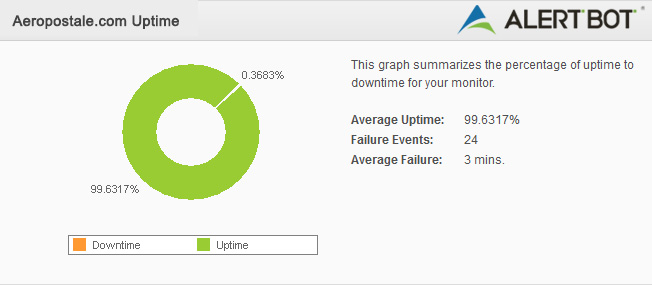
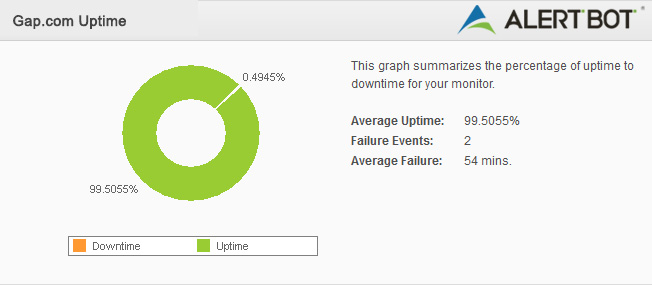
Both Aero’s and GAP’s sites achieved 99% uptime. Neither saw significant downtime, which is expected, but each one experienced some sluggish speeds and even load time timeouts on a couple occasions.
Aeropostale.com experienced 99.64% uptime, with over 20 errors recorded due to slow load times or brief periods of unresponsiveness. None of these events lasted longer than a couple minutes, however, and none of them amounted to any significant downtime. Because of this, we still consider their performance to be pretty good. (Aeropostale.com 8/10)
GAP.com experienced fewer issues, but struggled with some significant slowness on August 9th, resulting in 99.50% uptime. Otherwise, they would have an overall stronger performance during this time period than Aero. (GAP.com 8/10)
Speed
When evaluating a website’s speed, we look at the time it takes the site’s homepage to render and load to the point of being fully interactive by the user. These tests are performed from the perspective of a first-time visitor with no prior cache of the website’s content. AlertBot runs the tests inside real Firefox web browsers using AlertBot’s TrueBrowser™ monitoring. We calculate the speed as an overall average across all locations during the time span selected for this Showdown.
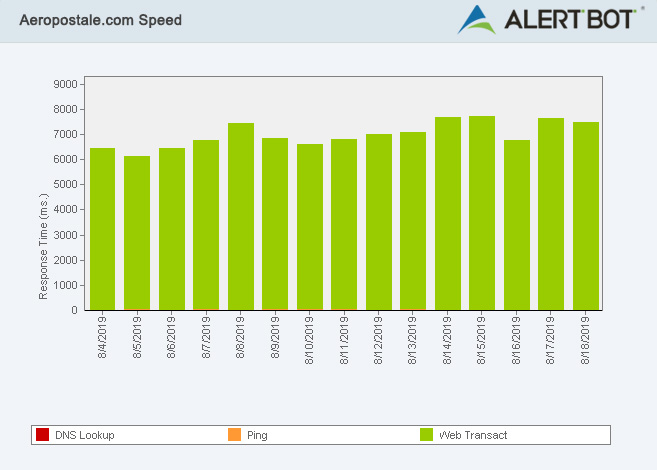
When it comes to page load times, Aeropostale performed respectably, but at about twice the load time as GAP’s site. Their best day, on average, was Monday, August 5th with 6.1 seconds. Their worst day, on average, was Thursday, August 15th, with 6.8 seconds. The site’s overall average speed across the entire test period was 6.97 seconds, which isn’t terrible, but it also isn’t much to brag about. However, one thing certainly gleaned from these results is that Aero’s site is relatively consistent across the board, in regards to their speed. (Aeropostale.com 7/10)
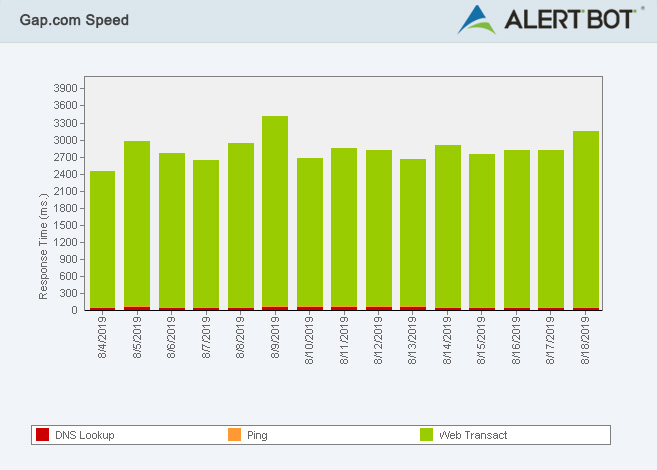
As teased above, GAP.com performed about twice as fast as Aeropostale.com did. Their best day, on average, was Sunday, August 4th with 2.4 seconds. That’s a pretty decent load time. GAP.com’s worst averaged day was Friday, August 9th, at 3.35 seconds, which is still almost half the time of Aero’s best day. The site’s overall average speed across the entire test period was 2.8 seconds, which is rather impressive. (GAP.com 8.5/10)
Geographic
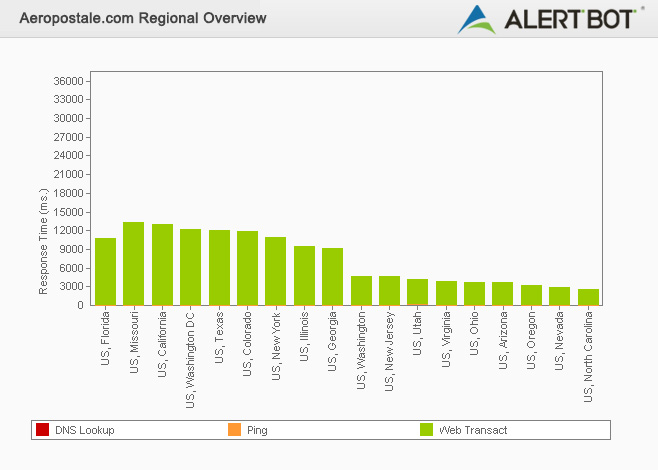
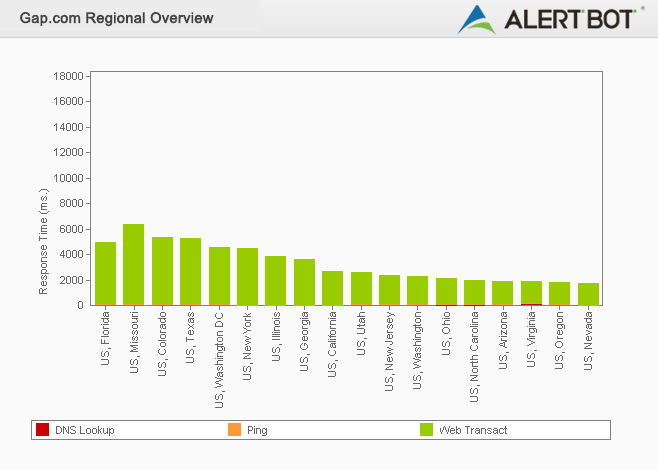
It’s always interesting to see how sites perform differently across the world. If we look exclusively at the United States, it’s intriguing to see which states regularly see faster or slower times than others. For this portion of the test, we compare the overall average speeds of each individual location captured during the selected period of time for this Showdown.
When it comes to geographic performance, it seems safe to say that Aero’s site is all over the map. They performed best in North Carolina at an average of 2.6 seconds, with Nevada in second at 3 seconds and Oregon third at 3.1 seconds. Those times are not bad at all. However, their slowest time was a dismal 13.3 seconds (ouch!) in Missouri, followed by 13 seconds in California, and Washington DC in third place at 12.1 seconds. (Aeropostale.com 7/10)
GAP.com also saw some drastic differences on either side of the scale, but not nearly as substantial a difference as Aero’s. Their fastest average performance was seen in Nevada, at 1.7 seconds. Oregon came in second at 1.7 seconds, and Virginia was third at 1.8 seconds. Missouri was once again at the bottom of the proverbially bargain bin with 6.3 seconds, followed by Colorado at 5.21 seconds and Texas at 5.17 seconds. Still, GAP’s geographically slowest times look like Aero’s overall fastest times, which is rather disappointing. (GAP.com 8.5/10)
Usability
For evaluating a site’s usability, we always select a common task a user might typically try to accomplish when visiting the sites and replicate it. For our previous Showdowns, we tested things like going through the motions of ordering movie tickets from a local theater or simply adding a similar item to both sites’ shopping carts. For this Showdown, we’ll see what the experience is like to use their respective websites to see if we can find a nice sweater (since we’d love to cozy up in this fall weather) and add it to our cart.
For each of these processes, we started by opening a new tab in Google Chrome and typing in the site’s URL.
From the point of typing www.GAP.com into our Chrome browser, it took 39.10 seconds and 8 clicks to get a sweater into the shopping card and begin the checkout process. GAP had two pop-ups about coupons and joining their mailing list, and it took a few clicks to get around those. Then we navigated to the Men’s section, selected the first long sleeve crewneck we found and added it to the cart. (And hey, it’s 40% off, too. Woohoo!)
For www.aeropostale.com, it took 6 clicks and 35 seconds to browse their fall collection, snag a thermal hoodie tee, add it to the cart, and click checkout (and hey, the price was about half-off, too!).
Honestly, both sites are pretty nice, easy to use, and straightforward. The pop-ups on GAP.com were a bit annoying, especially with there being two of them, but it’s tough to gripe about getting offered coupons to save money when you’re shopping. Aero’s site felt just a smidge more inviting, like you’re browsing a tangible catalog, and it seemed to offer quite a few options up front.
All things considered, our Usability scores are:
(Aeropostale.com 9/10)
(GAP.com 9/10)
Verdict
Both sites performed respectably, but when it comes to speed, one definitely outperformed the other—and the positive usability experience is just gravy. So, we’re pleased to announce this Showdown champion to be…
Winner: