

One of the most appealing things about ordering items online is receiving packages in the mail. Not only is it convenient for the fruits of your shopping toils to be brought directly to your door, but you can do your shopping from anywhere at any time of the day or night (and in your pajamas if you so desire). Two well-known, worldwide services that nearly everyone who has sent or received a parcel has used are UPS and FedEx. Both services are easily accessible for sending packages, and both are frequently used for receiving them. Both services also have websites that enable users to track their packages (if they’ve been given a tracking number), while also helping to provide resources for sending them out.
For our third Showdown, we set out to track the performance of these two services, trucking along until we could wrap up the results for delivery to you.
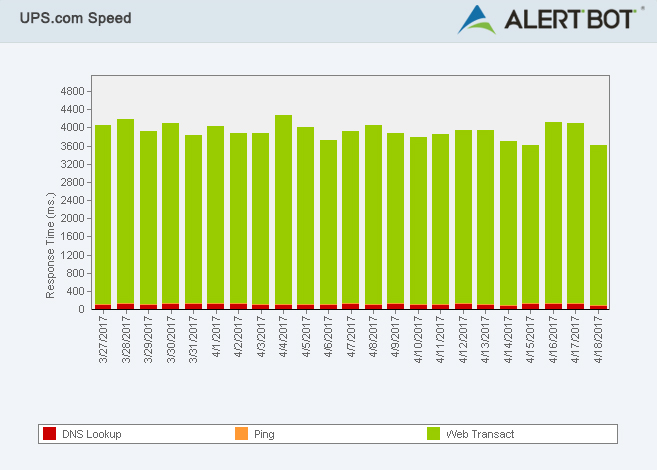
We used AlertBot’s external website monitoring system and its TrueBrowser™ technology to monitor both parcel service sites for three weeks, spanning from March 27, 2017 to April 17, 2017. Not surprisingly, the performance proved to be reliable for both sites. Neither service’s site went down, but one did prove to perform a little faster than the other.
Reliability
For the reliability evaluation of a website, we look for failure events (like when a page doesn’t fully load or it is completely down), and we look for what caused those failures.
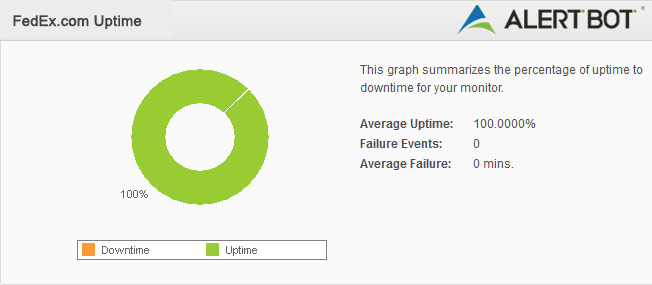
FedEx’s website experienced not a single, solitary failure event. At the very worst, it may have experienced some slight slowness for a short period of time, but it didn’t affect their overall reliability results. (FedEx 10/10)
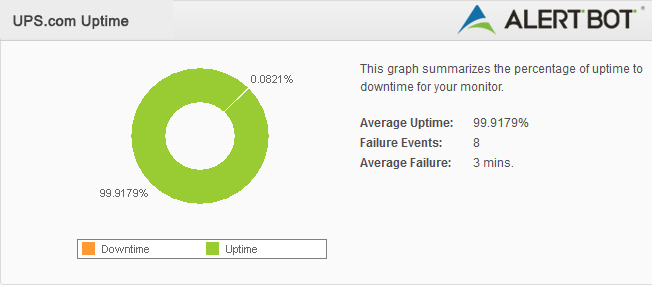
UPS’s website was a different story, but there were also no failure events or periods of actual downtime either. The most UPS’s site saw were a handful of warnings that the site was performing a little slower than usual, and a little slower than the average expected load time. These periods of minor slowness only lasted for about 3 to 5 minutes each. (UPS 9.5/10)
Speed
When evaluating a website’s speed, we look at the time it takes the site’s homepage to render and load to the point of being fully interactive by the user. We run these tests inside real Firefox web browsers using AlertBot’s TrueBrowser ™ monitoring.
Both websites have pretty basic homepages, so the load times for customers should be fairly quick (even on a slow internet connection) if the sites aren’t experiencing any server issues.
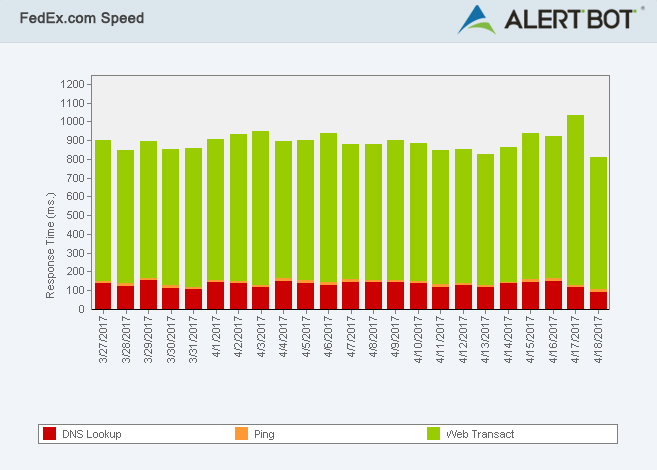
FedEx’s site speed is fantastic, averaging less than 1 second on most occasions. Its response time was recorded on Wednesday, April 5, 2017 at 0.5 seconds, while its slowest response time was on Monday, April 17, 2016 at just over 2 seconds (which is still very good). (FedEx 10/10)
UPS was also pretty good, but their best response time was about the same as FedEx’s worst response time. UPS’s best response time was 2 seconds on Tuesday, April 11, while their worst was on Monday, April 10th with just a hair under 6 seconds. The standard used to be 7 seconds, but these days, users expect sites to load in roughly 2 seconds. (UPS 8/10)
Geographic
It’s always interesting to see how sites perform differently across the world. If we look exclusively at the United States, it’s intriguing to see which states regularly see faster or slower times than others.
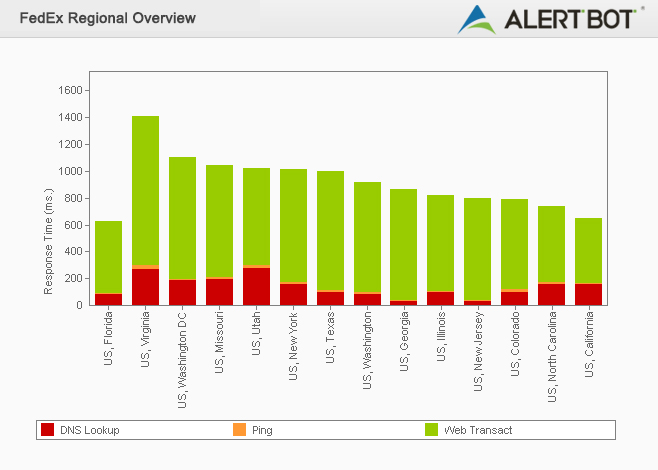
It’s also interesting to note that in most of these tests we’ve done for these Showdowns so far, California seems to frequently come out on top when it comes to website speed. With that said, FedEx seemed to perform best in California – at just under half a second, and performed the “worst” in Virginia, which still averaged around an impressive 1.1 seconds. (FedEx 10/10)
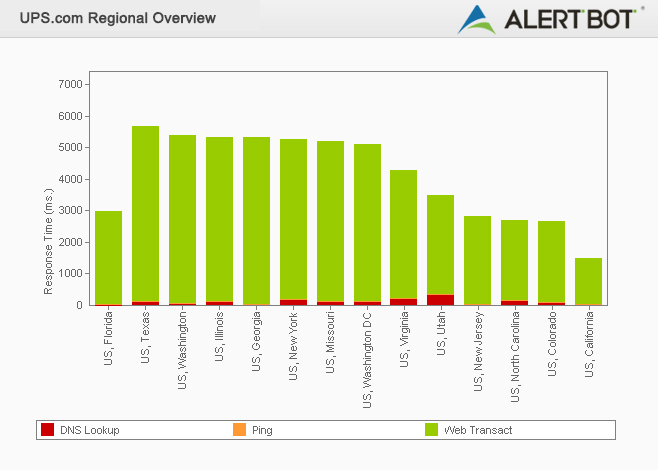
UPS also saw its best results in California, but clocked in at around 1.4 seconds there. Texas returned the slowest results, however, averaging around 5.6 seconds. (UPS 8/10)
Usability
For usability, we select a common task a user might typically try to accomplish when visiting the sites and replicate it. For our previous Showdown, we went through the motions of ordering tickets for a recent movie on MovieTickets.com and Fandango.com, For this evaluation of FedEx and UPS, we’ll see how the experience of tracking a real package goes.
For each package tracking process, we started with having the tracking number copied onto our clipboard and then typed the URL of the test site into our browser.
From the point of typing www.FedEx.com into our Firefox browser, selecting the tracking tab at the top, pasting the tracking number into the search field on the left sidebar and clicking “Track,” it took only 15 seconds to get to the tracking results. That’s really fast! We then tried the same process again using the Google Chrome browser, for which the “region” needed to be selected first this time, it took only a second longer to complete!
Now, from the point of typing www.UPS.com into our Firefox browser, selecting the region, pasting the tracking number into the search field on the left sidebar and clicking “Track,” it took roughly 22 seconds to get to the tracking results. That’s not bad, but it’s clearly slower than our FedEx experience. We then tried the same process again using the Google Chrome browser and it took an impressive 12 seconds to complete!
So, with all things considered, with the goal being to track a package as quickly as possible, here are the Usability scores:
(FedEx 10/10) (UPS 9/10)
Final Verdict
It’s a close match, to be honest, but we’d have to say that FedEx.com still outperformed UPS.com in the speed factor, delivering more than just highly anticipated parcels to its customers, but reliable website performance swiftly as well.
So, for the third AlertBot Showdown, the site that gets to join the ranks of previous winners Apple and Fandango is…
WINNER:

>