Skip to content
The Official Blog The Official Blog
  • Home
  • About AlertBot
  • Home
  • About AlertBot
  • FaceBook
  • X
  • Instagram
  • LinkedIn
Free Trial
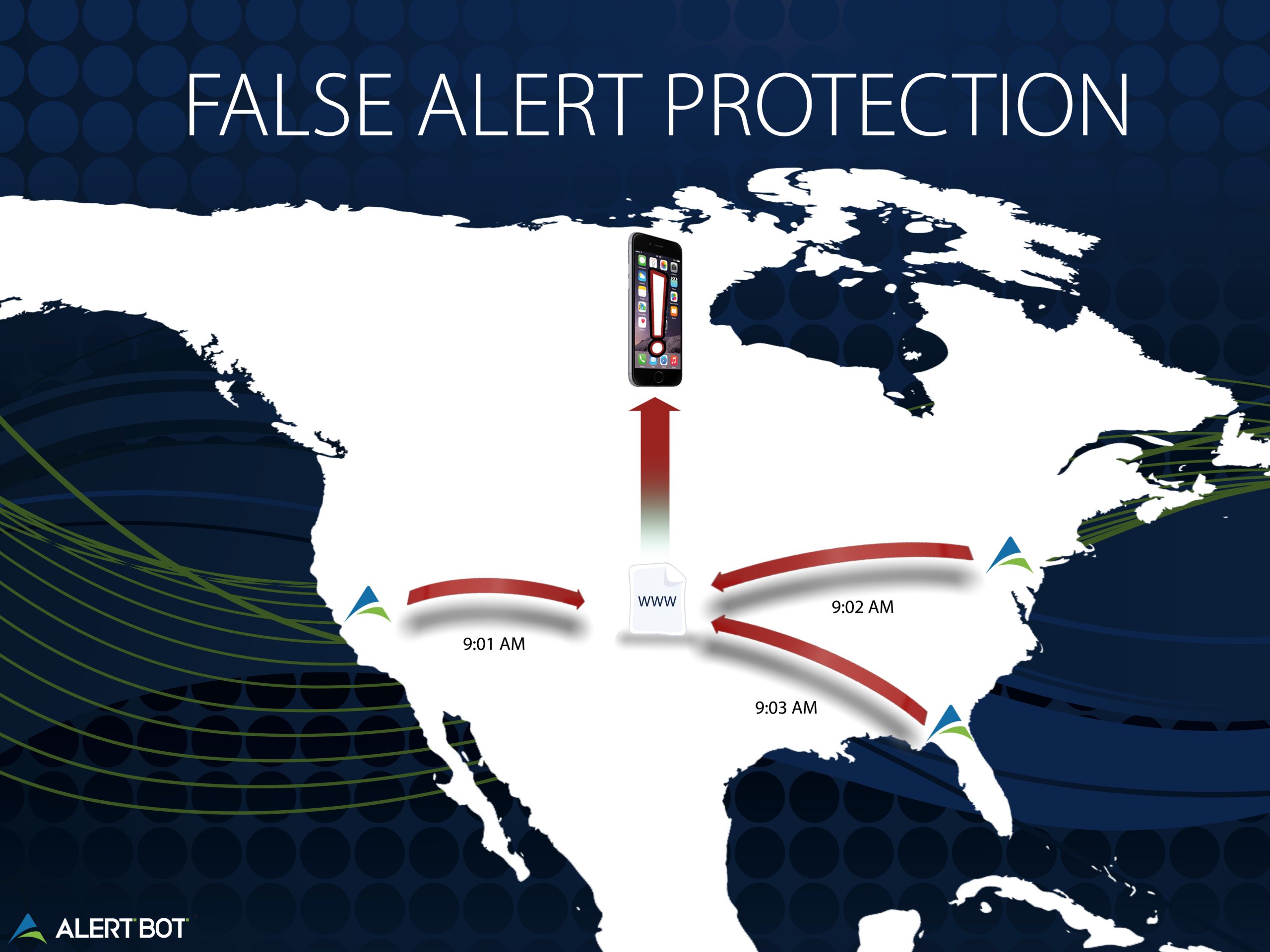
An illustrated map of the US with the alertbot logo in the middle and arrows coming off of it with a cell phone hovering above. Text reads "False Alert Protection"
Real Browser Website MonitoringReportsUptime MonitoringWeb Performance Tips

Protection Against Website Monitoring False Alerts

By AlertBot
March 20, 2015 2 Min Read
Comments Off on Protection Against Website Monitoring False Alerts

Protection Against Website Monitoring False Alerts

As website owners, uptime is about as crucial as making sure the front door on a shop owner’s local 24-hour business isn’t locked. We need visitors and customers to be able to reach us at all times. AlertBot’s service can ensure that uptime is consistent and reliable. Of all its features, AlertBot’s alerting process is what ultimately gives us website owners peace of mind.

A robot pointing to a palm pilot with icons and a bar graph coming out of it.

AlertBot’s alerting system differs from most in the way that it works hard to avoid false alarms. No one likes getting an alert that their site is down when it really isn’t, and AlertBot combats this by testing your site’s availability from more than one location before sending you that digital elbow nudge about your site’s downtime. For example, if a test server in New York responds that your site is down (or producing an error) at the moment, it’ll test it from another location—say, California—within 60 seconds. It’s only after the failure is verified from this second location that it will deem the error legitimate and begin alerting.  You won’t just be getting an alert based on a brief outage in one isolated location.

The alerting process is versatile as well. You can be alerted via email, text-message or automated phone call, or through any combination of these options. For example, with SMS text messaging, you might get a message sent to your phone from AlertBot specifying what went down. You then can take whatever necessary steps needed—depending on the cause of the error—to get things back up and running smoothly again. AlertBot will continue to test your site’s availability until it is, and you’ll be notified via text once more once it’s back up, with the amount of time your site (or the specified portion or page of your site) was inaccessible displayed as well (whether it be minutes or hours). It’s a great way to remain aware of your website’s performance day or night. It’s also a great way to pinpoint problem areas of our site to know what to fix or improve.

For more information about AlertBot’s alerting services and features, click here.

Author

AlertBot

Follow Me
Other Articles
Photo from the outside of Santa Clara Convention Center in Santa Clara, California at night
Previous

AlertBot to Sponsor O’Reilly Velocity Conference in Santa Clara, California

Next

Using Monitoring Reports To Improve Website Performance

Recent Posts

  • Unpacking the Elements of Site Uptime (by way of Jeopardy!)
  • API Monitoring Basics
  • Reality Bites: 7 Key Disadvantages of Real User Monitoring
  • 100% Solutions, Zero Snark: What Makes AlertBot Customer Support Superior
  • Synthetic Monitoring: Frequently Asked Questions

Recent Comments

No comments to show.

Archives

  • October 2025
  • August 2025
  • May 2025
  • April 2025
  • March 2025
  • November 2024
  • August 2024
  • April 2024
  • February 2024
  • January 2024
  • November 2023
  • October 2023
  • August 2023
  • July 2023
  • March 2023
  • February 2023
  • January 2023
  • December 2022
  • September 2022
  • August 2022
  • June 2022
  • April 2022
  • February 2022
  • December 2021
  • November 2021
  • September 2021
  • July 2021
  • May 2021
  • April 2021
  • February 2021
  • January 2021
  • December 2020
  • October 2020
  • August 2020
  • June 2020
  • April 2020
  • March 2020
  • February 2020
  • January 2020
  • November 2019
  • October 2019
  • September 2019
  • July 2019
  • June 2019
  • March 2019
  • January 2019
  • November 2018
  • October 2018
  • August 2018
  • June 2018
  • May 2018
  • April 2018
  • February 2018
  • January 2018
  • November 2017
  • October 2017
  • August 2017
  • July 2017
  • May 2017
  • April 2017
  • March 2017
  • February 2017
  • January 2017
  • December 2016
  • November 2016
  • September 2016
  • June 2016
  • May 2016
  • April 2016
  • March 2016
  • February 2016
  • January 2016
  • December 2015
  • November 2015
  • September 2015
  • August 2015
  • July 2015
  • June 2015
  • April 2015
  • March 2015
  • February 2015
  • September 2014
  • August 2014
  • May 2014

Categories

  • AlertBot Features
  • API Monitoring
  • Ecommerce Performance
  • Events
  • Industry Chatter
  • Real Browser Website Monitoring
  • Reports
  • SEO
  • Uptime Monitoring
  • Web Performance Tips
  • Website Showdowns

You May Have Missed

Real Browser Website Monitoring Uptime Monitoring

Unpacking the Elements of Site Uptime (by way of Jeopardy!)

AlertBot
By AlertBot
October 23, 2025
AlertBot Features API Monitoring Uptime Monitoring

API Monitoring Basics

AlertBot
By AlertBot
August 26, 2025
Real Browser Website Monitoring SEO Uptime Monitoring Web Performance Tips

Reality Bites: 7 Key Disadvantages of Real User Monitoring

AlertBot
By AlertBot
May 13, 2025
AlertBot Features Real Browser Website Monitoring Uptime Monitoring

100% Solutions, Zero Snark: What Makes AlertBot Customer Support Superior

AlertBot
By AlertBot
April 15, 2025
Synthetic Monitoring: Frequently Asked Questions title graphic illustration of a laptop and scientists checking graphs and charts
Real Browser Website Monitoring Uptime Monitoring

Synthetic Monitoring: Frequently Asked Questions

AlertBot
By AlertBot
March 5, 2025
Real Browser Website Monitoring Uptime Monitoring Web Performance Tips

Synthetic Website Monitoring Best Practices

AlertBot
By AlertBot
November 19, 2024
Real Browser Website Monitoring Uptime Monitoring Web Performance Tips

Three Advanced Notification Features that Your Site Uptime Monitoring Vendor MUST Deliver

AlertBot
By AlertBot
August 29, 2024
SEO Uptime Monitoring Web Performance Tips

3 Ways Site Uptime Monitoring Boosts SEO

AlertBot
By AlertBot
April 30, 2024
Graphic of a computer monitor with a frown face on the screen and x's for eyes. Clouds and spots float around, an exclamation point triangle alert symbol shows next to the monitor.
Web Performance Tips

What is a HTTP 500 Error & How Can You Fix It?

AlertBot
By AlertBot
February 15, 2024
Copyright 2026 — The Official Blog. All rights reserved. Blogsy WordPress Theme